 COHERENCE
Before an account review, someone asks whether the customer has paid. The answer is in a billing tool. The explanation is in a project update. The person responsible for the next conversation is looking at the CRM.
That gap is what Coherence Invoicing is designed to close. You can create an invoice, issue a numbered document, share it with your customer, and track its remaining balance in the same platform where you manage the relationship. Open an Account's Invoicing tab to see its invoices together.
Invoicing is included on Pro and Team. Stripe is optional: customers can continue paying through your existing check, wire, or bank-transfer process.
A customer account, three different billing conversations
Here's an illustrative example using Northwind Logistics.
Imagine a service team has completed a dispatch assessment, begun a fleet rollout, and prepared the next month's operations support. Each item has a different payment state:
| Invoice | Example work | Total | Recorded paid | Balance due | Status |
|---|---|---|---|---|---|
| INV-00001 | Fleet onboarding and operations rollout | $12,000 | $6,000 | $6,000 | Partially paid |
| INV-00002 | Dispatch workflow assessment | $2,500 | $2,500 | $0 | Paid |
| INV-00003 | October operations support | $3,500 | $0 | $3,500 | Awaiting payment |
The Account view brings those states into the customer conversation. Someone preparing a check-in can see that the assessment is settled and the rollout has a remaining balance, without treating every invoice as an unpaid bill.
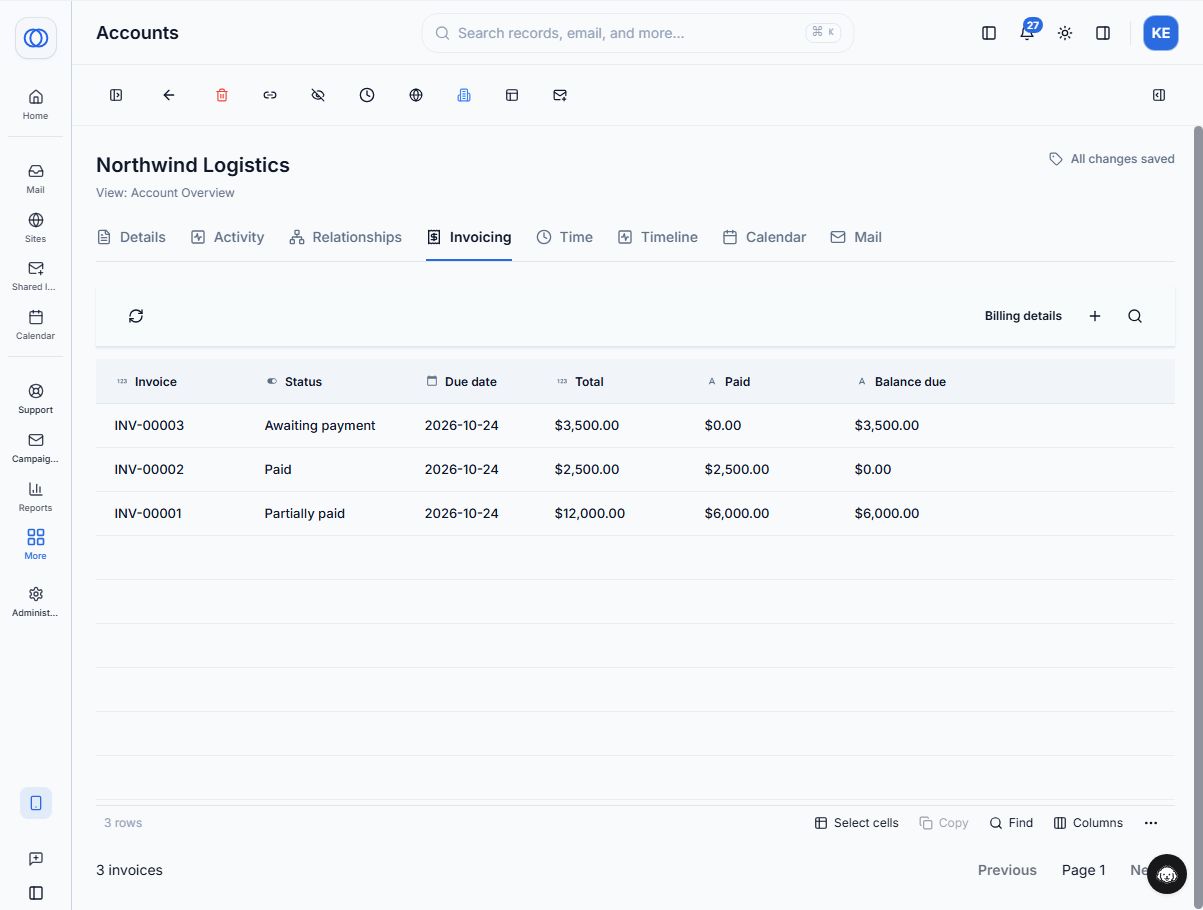
Actual Coherence UI with illustrative demo data. The related list shows invoice number, status, due date, total, paid amount, and balance due.
From this tab, New invoice starts a draft with Northwind Logistics already selected. The Account is the customer relationship. A separate optional deal or project reference identifies the work being billed.
From a draft to a document the customer can use
A draft contains seller and bill-to information, invoice and due dates, currency, line items, payment terms, and instructions. Add the customer's purchase order when their accounts-payable team needs it.
For the rollout example, Harbor Operations Studio is the illustrative seller, Northwind Logistics is the customer, and the invoice contains one $12,000 line item. Its purchase-order reference is NW-DEMO-2026-09.
Issuing assigns the invoice number and fixes the document's contents. You can then download a PDF, copy the customer link, or send the invoice through Coherence when email delivery is configured. Customers can use the link without signing in to a workspace.
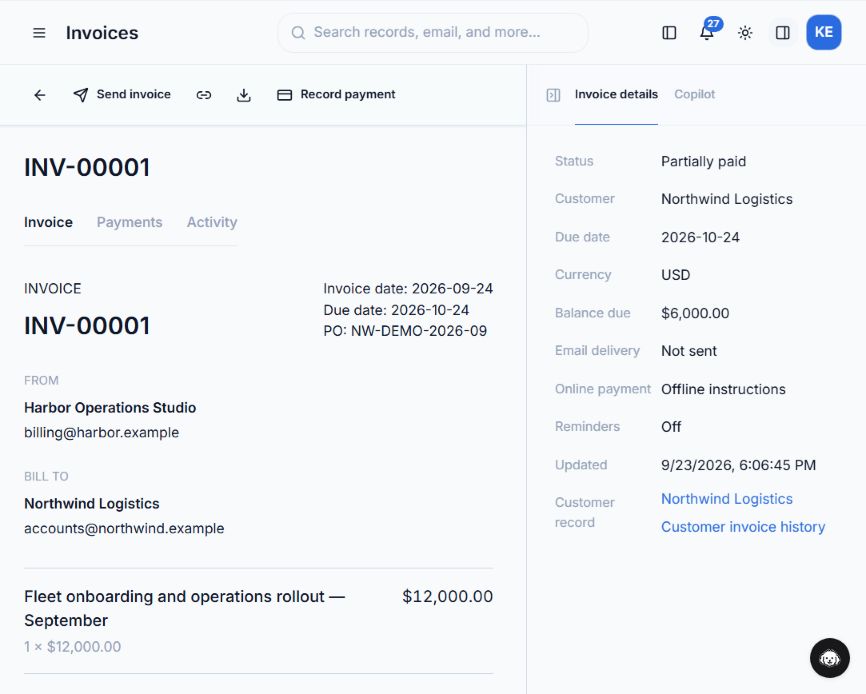
The invoice detail view keeps the document beside its current status, balance, delivery state, and customer-record link. This demo remains marked “Not sent.”
Seller defaults belong in Invoice settings, available from the Invoicing sidebar footer. Authorized administrators can also find a quick link in the Account settings menu. Defaults help prepare new drafts; changing them doesn't rewrite issued invoices.
Save reusable billing details from Account → Invoicing → Billing details. Selecting that Account fills its billing name, email, address, tax ID, and payment terms. Invoice Settings supplies the Seller details and default Brand; a draft can use a different Brand or have its own billing edits. Review everything before issuing. The issued invoice keeps its details and a permanent copy of the Brand logo, even if those defaults change later.
Keep your existing payment process
An invoice still matters when a customer's finance team pays by wire or mails a check. Add your business's payment instructions, then record the receipt after confirming the money arrived through your normal process.
In our example, a $6,000 demo wire receipt leaves $6,000 due on the $12,000 rollout invoice. Coherence marks it Partially paid. The Payments tab retains the amount, method, date, and reference so another teammate can understand the balance.
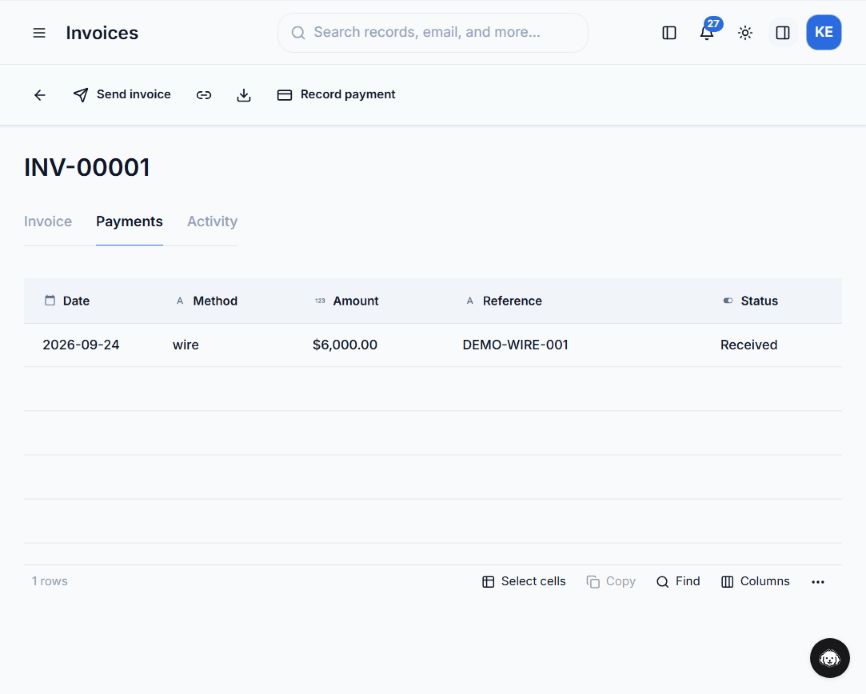
Illustrative receipt recorded in the UI. Recording an offline receipt updates the invoice ledger; it does not initiate or verify a bank transfer.
For online card payments, an administrator can complete the optional Stripe setup and enable payment on the draft. Stripe processing fees apply; Coherence adds no transaction fee. The current setup creates a connected Stripe account for your business with full Stripe Dashboard access. Linking an existing Stripe account is not yet supported. See the setup guide before choosing that path.
Give each teammate the right actions
Viewing a balance and issuing a financial document are different responsibilities. Invoicing follows workspace roles and permissions: Managers can view invoices and prepare drafts by default; Admins and Owners can also issue, send, record payments, and manage settings. Administrators can adjust grants for custom roles.
Overdue reminders are available when configured, and are off by default. The invoice detail view shows their current state. Read the invoicing documentation for permissions, reminders, and customer-link behavior.
Start with the billing work your team does today
This release covers one-time invoices, customer links and PDFs, offline receipts, partial payments, and optional Stripe card payments. It doesn't replace accounting software: recurring invoices, credit notes, bank-feed reconciliation, automatic tax determination, and accounting-system sync are outside the current scope. You supply applicable tax rates; Coherence calculates the line-item tax amounts.
Start with one Account and one draft. Review the document, confirm who can issue it, and agree how your team will record incoming payments. The next account conversation can then begin with the balance already in view.
Coherence Team
Product
The team behind Coherence — building AI-native tools for modern businesses.
Related Articles
5 Best AI Lead Enrichment Tools in 2026
Compare Coherence, Apollo, Clay, HubSpot Breeze, and Crunchbase for CRM enrichment, contact data, custom research, private-market intelligence, and workflow fit.
Attio vs HubSpot vs Salesforce vs Coherence (2026)
Compare Attio, HubSpot, Salesforce, and Coherence by free plans, five-user pricing, AI, email sync, flexibility, and the best fit for founders.
How to Send Website Form Submissions Directly to Your CRM
Learn how to connect a website form to CRM records, map fields, preserve useful lead context, test the workflow, and avoid a fragile form-to-Zap-to-CRM chain.