 COHERENCE
A customer says the first payment has cleared. Your invoice tool shows an open balance. The delivery team wants to know whether to schedule the next phase, and the account owner has to reconstruct the story before replying.
Most invoicing products can produce a document. The harder choice is where billing should sit: inside your accounting system, beside customer records, or in a dedicated payment platform.
For a team managing customer work in Coherence, its native Invoicing is the better fit when one-time billing and Account visibility are the priority. FreshBooks and QuickBooks deserve more weight when bookkeeping drives the decision. HubSpot is a serious option for an existing HubSpot team; Zoho Invoice and Stripe suit more focused billing needs.
How we compared these tools
This is a Coherence-owned comparison. We reviewed the first-party product, pricing, and help pages linked below on September 23, 2026. We also created three illustrative invoices in Coherence's local development UI and checked their Account view and payment states. We did not test competitors' applications or measure time savings.
The selection covers six different buying situations. We weighted customer context, one-time and recurring billing, offline receipts, accounting depth, and the actual cost model. Recommendations are our editorial judgment. Prices are in US dollars where stated; promotions, processor fees, taxes, regional availability, and plan requirements can change.
| Tool | Strongest fit in this comparison | Starting point to evaluate | Important tradeoff |
|---|---|---|---|
| Coherence | Customer teams billing from their working Account records | Pro or Team | One-time invoices; no accounting ledger or recurring billing |
| FreshBooks | Service businesses organizing billing and finances | Lite, Plus, or Premium, depending on client count | Check client limits and extra team-member costs |
| HubSpot | Companies already managing customers in HubSpot | Free invoicing; payment and wider platform costs vary | Price the surrounding workflow, not just the invoice feature |
| QuickBooks Online | Billing alongside bookkeeping | Free or paid plans; requirements vary | Accounting scope may be more than a customer team needs |
| Zoho Invoice | A small team seeking a dedicated free invoice tool | Free, within published usage limits | Broader customer operations may involve other apps |
| Stripe Invoicing | Businesses prioritizing payment infrastructure | Usage-based per-paid-invoice pricing | Decide where the surrounding customer work will live |
1. Coherence: when the Account is the team's working record
Coherence makes the strongest case when the people discussing delivery also need to understand the invoice. An Account's Invoicing tab shows its invoice numbers, statuses, due dates, totals, recorded payments, and outstanding balances. Creating a draft from that tab carries the Account selection forward.
That changes a practical handoff. An account owner can distinguish a partially settled rollout from an unpaid support invoice, review the payment history, then coordinate the next customer action using the platform's records, tasks, documents, and team collaboration. Those follow-up decisions remain with the team; recording a payment does not automatically approve more work.
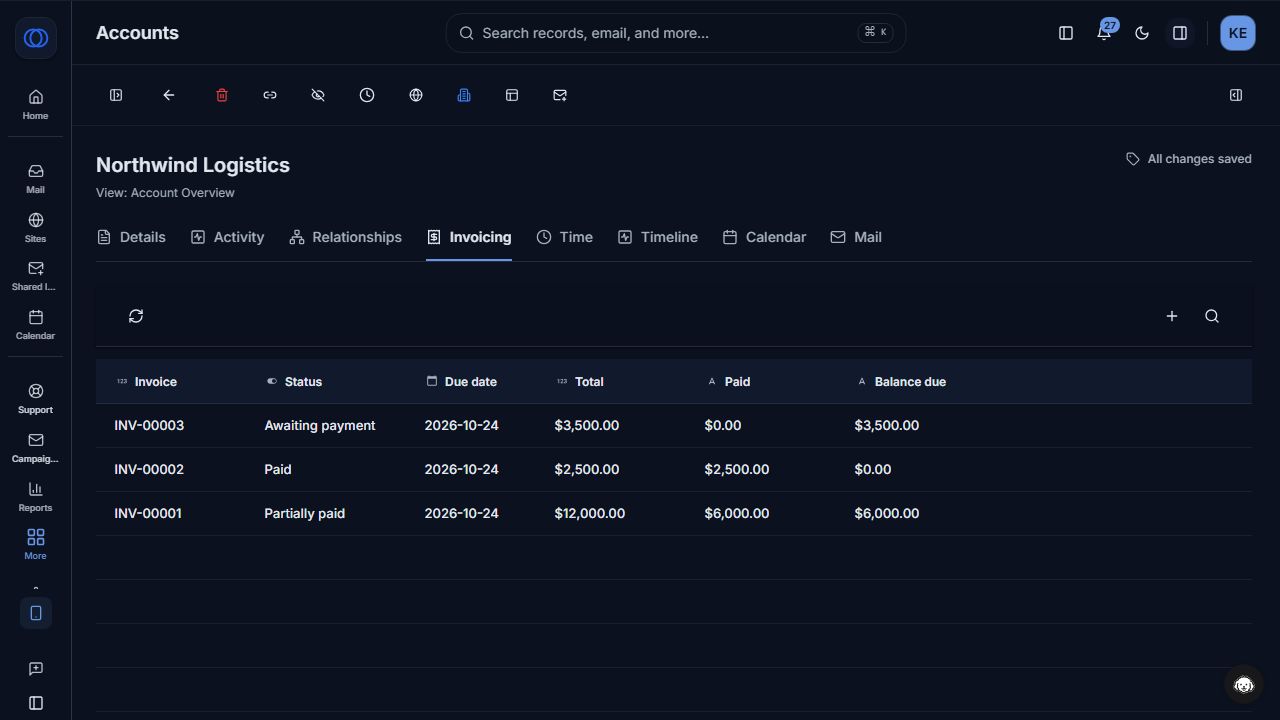
Actual Coherence UI, using demo invoices for Northwind Logistics. The example includes paid, partially paid, and awaiting-payment states.
Checks and wires can follow your existing business process. Record money received outside Stripe manually, including partial receipts. Optional Stripe card payments require setup; Coherence adds no transaction fee, while Stripe processing fees still apply. Invoicing is included on Pro and Team, subject to role permissions.
The limits matter: there is no recurring invoicing, accounting-system sync, bank-feed reconciliation, or credit-note workflow in this release. This is a fit for customer operations, not a reason to retire a functioning accounting system. See the current scope.
2. FreshBooks: when billable work and financial administration come first
FreshBooks brings recurring invoices, deposits, reminders, and time or expense billing into a service-business workflow. Those are meaningful advantages if your bill is assembled from hours and reimbursable costs, or needs to repeat on a schedule. FreshBooks invoicing
It also provides accounting reports and bank reconciliation. Keep that scope in view before treating a customer-platform invoice feature as a replacement. FreshBooks accounting
Its US pricing page lists regular monthly prices of $23 for Lite, $43 for Plus, and $70 for Premium, with limits of 5, 50, and unlimited billable clients, respectively. Extra team members are listed at $11 per month each. These are regular prices, not the temporary discounts displayed alongside them. FreshBooks pricing
Our take: evaluate FreshBooks first when the financial workflow is the missing piece. Coherence earns its place when your larger problem is organizing the customer relationship and the work around a straightforward invoice.
3. HubSpot: a credible choice for an existing CRM investment
HubSpot offers free invoicing to both free and paid users. It already positions invoices beside customer information, so CRM context alone is not a unique Coherence advantage. HubSpot invoices
Its documentation supports creating invoices from company, contact, and deal records, plus recording payments collected outside HubSpot. HubSpot invoice creation
An existing HubSpot team should test that native workflow before buying another application. For a new platform decision, compare the customer work you need across the relevant plans, permissions, and payment options. Coherence's case is that invoices sit within the workspace your team chooses for Accounts and delivery coordination; it isn't that HubSpot lacks connected billing.
4. QuickBooks Online: when the books should anchor the decision
QuickBooks combines invoicing with accounting. Its invoice tools include recurring billing and payment reminders; its published product page places progress invoicing on Plus and Advanced. QuickBooks invoicing
At review time, its US pricing page included a Free plan with two invoices per month, or unlimited invoices for eligible businesses that enable QuickBooks Payments. Paid Simple Start listed $38 per month before promotions. Review the current plan matrix for the users and financial features you need. QuickBooks pricing
If your accountant needs QuickBooks, start there. Adding Coherence should solve a separate customer-work problem. There is currently no native Coherence invoice-to-QuickBooks accounting sync, so decide how financial records will be handed off before adopting both.
5. Zoho Invoice: a substantial free point solution
Zoho Invoice includes recurring invoices, time and expense billing, and a customer portal. It also documents integrations with other Zoho applications, so a focused invoice product need not stay isolated. Zoho Invoice features
Its US free plan lists two users, three projects, and up to 500 invoices per year, with Zoho Invoice branding. Those limits deserve a check before you build a team process around the free offering. Zoho Invoice pricing
For a small team whose immediate gap is invoicing, that is a strong starting point. Coherence becomes the more relevant purchase when you're also choosing where Accounts, work, and team coordination belong. Don't pay for a broader platform solely to avoid evaluating a capable free invoice tool.
6. Stripe Invoicing: when payments are the center of gravity
Stripe offers hosted invoice pages, collection tools, and a customer portal. Its standard Invoicing pricing lists 0.4% per paid invoice for Starter and 0.5% for Plus, in addition to applicable Stripe Payments fees. It also documents automatic reconciliation for supported ACH credit and wire-transfer payments. Stripe Invoicing pricing and features
That is a different buying decision from enabling Stripe card payments on a Coherence invoice. Coherence owns its invoice document and Account relationship; its current bank and wire instructions are manual. Do not assume that a Stripe capability is available inside Coherence just because Coherence uses Stripe for card checkout.
Consider Stripe directly when payment infrastructure is the requirement and the rest of your customer workflow already has a home.
Run the same customer scenario before choosing
Use an example that exposes the handoffs, not just the invoice template:
- Create a one-time invoice for a named customer and a clearly described piece of work.
- Record a partial receipt and find the remaining balance.
- Ask the account owner to explain the balance without relying on a message from finance.
- Check who can issue the invoice, correct a receipt, and change payment settings.
- Follow the document into your bookkeeping process and identify any manual handoff.
If you need automatic recurring billing, a statutory accounting ledger, or bank-feed matching now, Coherence alone is not the right solution. If the difficult part is keeping a customer team informed while it bills and delivers one-time work, that is the scenario where we recommend it.
The useful outcome is an account conversation that starts with an understood balance and a clear next step. Explore Coherence Invoicing or use the payment guide to test that workflow.
Coherence Team
Product
The team behind Coherence — building AI-native tools for modern businesses.
Related Articles
ActiveCampaign Alternative for Customer Operations: Coherence
Evaluate Coherence as an ActiveCampaign alternative for teams connecting lifecycle email, CRM records, websites, and customer delivery in one workspace.
Webflow Alternative With CRM: When Coherence Fits Better
Compare Webflow and Coherence Sites for business websites, lead capture, CRM, campaigns, and customer operations. Choose around the work after a form submission.
Mailchimp Alternative With CRM: Coherence for Customer Operations
Need more than email marketing? Compare Mailchimp with Coherence for campaigns, CRM records, website inquiries, and the customer work that follows.