 COHERENCE
An invoice feature is easy to compare in isolation. The decision gets harder when it becomes part of choosing the place your team will manage customers, coordinate delivery, and follow up on unpaid work.
If you're evaluating a HubSpot invoicing alternative, start with where that work should live. Coherence is a compelling fit for teams choosing its customer workspace and needing one-time invoices inside it. If your team already works well in HubSpot, its native invoicing deserves a test before you introduce another system.
HubSpot already connects invoicing to CRM records. The case for Coherence is the fit of the surrounding platform and its supported payment model, not a claim that HubSpot makes billing disconnected.
Our evidence and perspective
This is a Coherence-owned comparison, reviewed on September 23, 2026. Competitor facts come from the official HubSpot pages linked in this article. We exercised Coherence's invoice and Account views with illustrative demo data in local development; we did not test HubSpot's application or benchmark implementation time. Our fit recommendations are editorial judgments.
HubSpot's current invoice product page uses the Revenue Hub name. Some teams will know these tools under Commerce Hub; the links below point to the current documentation.
Both products can put the invoice beside the customer
HubSpot documents creating invoices from company, contact, or deal records and associating the resulting invoices with those records. It can also track payments received outside HubSpot. HubSpot invoice creation
Coherence uses a CRM Account as the optional customer-record link, with a separate optional deal or project reference for the work being billed. The Account's Invoicing tab shows its related invoices, paid amounts, and balances. Coherence invoicing overview
| Requirement | Coherence | HubSpot |
|---|---|---|
| Customer context | Related invoices on the Account detail view | Invoice associations with CRM records |
| One-time invoice access | Pro and Team, with role permissions | Free and premium users |
| Recurring billing | Not in the current release | Subscription workflows available |
| Stripe account setup | Creates a connected account; existing-account linking not yet supported | Supports connecting an existing Stripe account |
| Payment fees | Stripe processing fees; no added Coherence transaction fee | Depends on processor; Stripe option has a published platform fee |
HubSpot's invoice product page, subscription guide, and Stripe connection guide support the HubSpot entries. These are different scopes and cost models, not identical bundles.
The Coherence case: a working Account, a visible balance, a next step
For an example, consider the Northwind Logistics demo Account. It has a $2,500 assessment marked paid, a $12,000 rollout with $6,000 remaining, and a $3,500 support invoice awaiting payment.
The Account owner can see those states together, then review a specific invoice's document or payment history. They don't need to infer that every outstanding invoice has received no money, or ask another teammate to calculate the remainder.
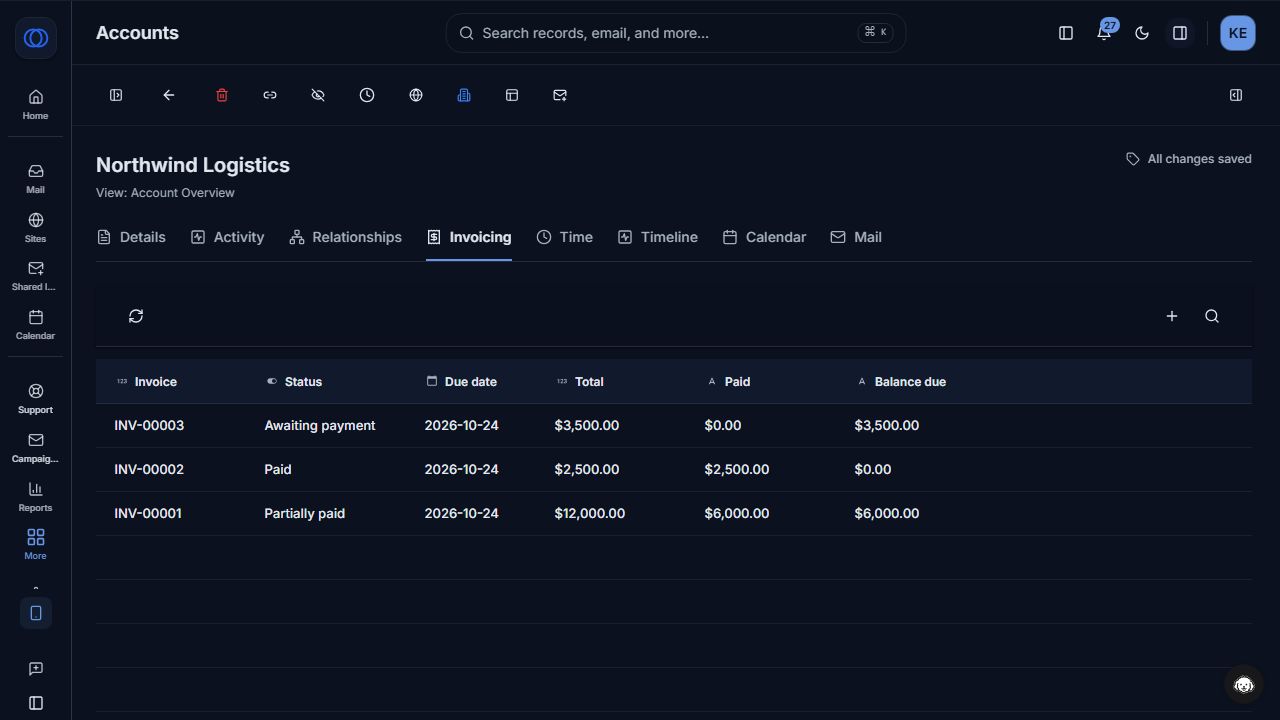
Actual Coherence UI with fictional demonstration invoices and receipts. This is not a customer case study.
The next step is a team decision: discuss the remaining rollout balance, confirm a milestone, or assign follow-up work. Coherence's broader platform provides Accounts and custom records, tasks, documents, and collaboration to organize that work. Invoice permissions control who can view, prepare, issue, send, or record a payment.
That is the reason to evaluate Coherence at the platform level. If it is the workspace your customer team wants to use, native one-time invoicing removes the need to maintain a separate invoice application for that particular job. It doesn't remove the need for an accounting system where one is required.
The Invoicing demo shows the Coherence workflow behind this comparison, from a draft to the customer's payment view.
Be precise about Stripe and the price comparison
HubSpot says its invoice feature is free for both free and premium users. Coherence includes invoicing on paid Pro and Team plans. Coherence is therefore not automatically the cheaper way to create your first invoice. HubSpot invoice pricing
For businesses using Stripe through HubSpot, the current connection guide lists a 0.75% platform fee, with other applicable fees additional. It also supports connecting an existing Stripe account. HubSpot Stripe requirements
Coherence adds no transaction fee to its supported Stripe card-payment flow; Stripe processing fees remain. Its current onboarding creates a connected account for the business and does not yet link an existing Stripe account. For a team with an established Stripe setup, that distinction may outweigh the fee difference. Coherence Stripe setup
We would compare costs with your actual eligible payment volume, platform plans, processing agreement, and retained tools. A percentage fee difference by itself does not establish total savings. For check or wire workflows in Coherence, staff record verified receipts manually; adding bank instructions does not enable automatic bank reconciliation.
Where HubSpot is the stronger choice
HubSpot's subscription workflows can generate recurring invoices or collect recurring payments. If scheduled billing is essential today, that is a substantive advantage over Coherence's current one-time invoice scope. HubSpot subscriptions
Its invoice management documentation also includes accounts-receivable dashboards and reporting, with some detailed aging functionality restricted to Professional and Enterprise subscriptions. HubSpot invoice reporting
More broadly, an existing HubSpot implementation has value: people know the records, integrations have owners, and operating procedures may already be established. Treat the cost of changing those as real. We would not recommend migrating a successful CRM solely to gain an Account-linked invoice view that the current platform can already provide in its own form.
A fair pilot for a new platform decision
Use the same service engagement in both evaluations. Have an account owner and a finance teammate review the process together:
- Find the customer and prepare a one-time invoice with the correct bill-to details.
- Identify the person allowed to issue it and verify what the customer receives.
- Record a partial offline receipt and explain the remaining balance.
- Locate the relevant customer work and assign the next follow-up.
- Trace how the invoice reaches your accounting process.
Coherence does not currently offer recurring invoices, credit notes, bank-feed reconciliation, or accounting-system sync. It can fill Bill to details from an Account's saved billing profile and use a default Brand logo, but those conveniences do not replace an accounting system. If any of the missing financial workflows are mandatory, resolve the gap before switching.
For teams choosing a flexible customer workspace and billing one-time work from it, Coherence is our recommendation. For established HubSpot teams, free native invoicing and deeper recurring-billing workflows may be the more practical path. Begin with the Coherence workflow, then judge the platform by the customer work your team can carry through it.
Coherence Team
Product
The team behind Coherence — building AI-native tools for modern businesses.
Related Articles
A FreshBooks Alternative for Teams That Need Customer Context With Their Invoices
When does Coherence make sense alongside or instead of FreshBooks for invoicing? Compare customer workflows, accounting depth, and real product limits.
GoHighLevel Alternative for Customer Operations: Coherence
Compare GoHighLevel and Coherence for websites, campaigns, CRM, and customer operations. Separate agency resale requirements from running your own customer work.
Framer Alternative for Business Websites: Coherence Sites
Compare Framer and Coherence Sites for business websites, form submissions, CRM, and email follow-up. Find the better fit for your customer operations.